

Opening Google Ads and launching a campaign is easy. Building a campaign that controls the budget, attracts relevant searches, and generates useful leads requires proper planning.
For beginners, terms such as campaign, ad group, keyword, bidding, assets, and conversions can initially feel confusing. But Google Ads follows a clear structure. Once you understand what belongs at each level, planning and managing campaigns becomes much easier.
At Dexta Academy, we teach Google Ads from a practical campaign-management perspective. Students learn how campaign structure influences search relevance, lead quality, budget allocation, optimisation, and reporting—not only where different settings are located.
This guide explains the complete Google Ads campaign structure using a practical Dexta Academy example.
What Is Google Ads Campaign Structure?
Google Ads campaign structure refers to how an advertising account is organised.
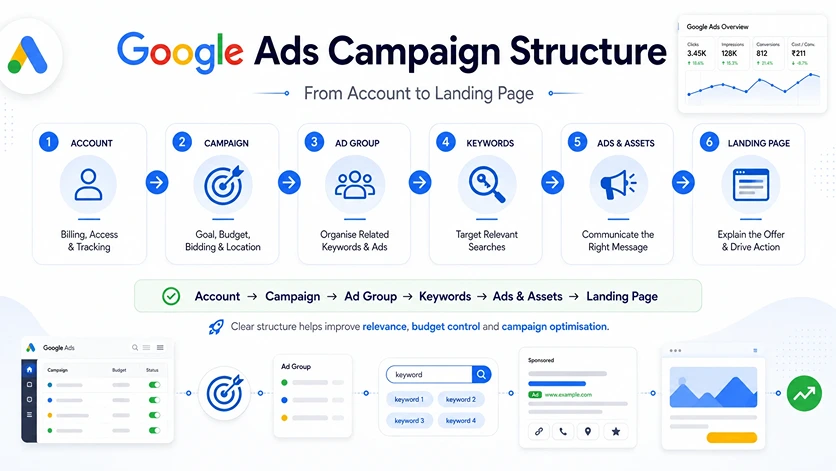
A standard Search campaign generally follows this hierarchy:
Google Ads Account → Campaign → Ad Group → Keywords → Ads → Landing Page
Each level serves a different purpose:
- The account contains business, billing, access, and tracking information.
- The campaign controls the main goal, budget, bidding, location, and campaign type.
- The ad group organises closely related keywords and ads.
- Keywords help Google understand which searches are relevant.
- Ads and assets communicate the offer to potential customers.
- The landing page explains the offer and encourages the visitor to take action.
A professional campaign does not need to be complicated. It needs to be clear enough for the marketer to understand where the budget was spent, what users searched, which message generated the lead, and what needs improvement.
Why Does Google Ads Account Structure Matter?
A clear Google Ads account structure helps you:
- Control the budget for different services
- Match ads with relevant searches
- Send users to suitable landing pages
- Compare locations, courses, and offers
- Identify wasted spending
- Understand which keywords generate leads
- Scale successful campaigns
- Create simple performance reports
Poor structure creates confusion.
For example, imagine placing keywords for a digital marketing course, free learning resources, job vacancies, and agency services inside one ad group. These searches have different intentions. One generic ad cannot answer all of them properly.
The campaign may generate clicks, but the marketer will struggle to understand which search theme produced relevant enquiries.
That is why campaign planning is an important part of Dexta’s agency-based learning approach.
Level 1: Google Ads Account
The account is the highest level of the Google Ads structure. It contains all the campaigns created for a business.
The account level normally includes:
- Business information
- Billing and payment details
- User access and permissions
- Linked tools and accounts
- Conversion actions
- Shared negative keyword lists
- Account-level assets
- Security and notification settings
A business can create multiple campaigns inside one account.
However, beginners should avoid managing completely unrelated businesses within the same account. Keeping separate businesses in separate accounts makes billing, access, reporting, conversion tracking, and data management clearer.
Before starting a campaign, confirm that:
- Billing is active
- The correct team members have access
- Google Analytics or other required tools are linked
- Conversion actions are configured
- Forms, calls, and other important actions are tracked correctly
A campaign should not be launched before its measurement system is ready.
Level 2: Campaign
The campaign is where the main strategic decisions are made.
Each campaign can have its own:
- Marketing objective
- Campaign type
- Daily budget
- Bidding strategy
- Location targeting
- Language settings
- Advertising schedule
- Network settings
- Conversion goals
Think of a campaign as a separate marketing plan for one important objective.
For example, Dexta Academy could create separate campaigns for:
- Digital marketing course enquiries
- Google Ads course enquiries
- Online course admissions
- Free demo-class registrations
- Brand searches for Dexta Academy
- Remarketing to previous website visitors
These campaigns may need different budgets, locations, messages, and landing pages. Combining everything into one campaign could make budget allocation and performance analysis difficult.
Campaign Objective
The objective defines what the business wants from the campaign.
Common objectives include:
- Sales
- Leads
- Website traffic
- App promotion
- Brand awareness
For an academy focused on admissions, the main objective should normally be qualified enquiries—not clicks alone.
Campaign Type
The campaign type decides where ads can appear and which formats are available.
Common Google Ads campaign types include:
- Search campaigns: Text ads that can appear when users search on Google
- Display campaigns: Visual ads shown across eligible websites and apps
- Video campaigns: Video advertising mainly across YouTube inventory
- Shopping campaigns: Product-based advertising connected to Merchant Center
- App campaigns: Campaigns designed to promote app installs or engagement
- Demand Gen campaigns: Visual campaigns across selected Google platforms
- Performance Max: Automated, goal-based campaigns across Google Ads inventory
Search campaigns are useful for beginners because they clearly demonstrate the connection between search intent, keywords, ads, and landing pages.
This foundation is also valuable for anyone developing broader performance marketing skills.
Campaign Budget
Google Ads budgets are generally controlled at the campaign level.
Suppose Dexta wants to allocate:
- ₹1,500 per day for classroom course enquiries
- ₹500 per day for online course enquiries
Separate campaigns would make this division easier to control.
If both offers are placed inside the same campaign, one may consume most of the available budget.
Location Targeting
Location settings define the geographical areas the campaign intends to reach.
Dexta could target Perinthalmanna and nearby towns for its classroom programme while targeting a wider Kerala audience for an online course.
Keeping these audiences in separate campaigns can make location-wise spending and lead-quality analysis clearer.
Level 3: Ad Groups
Ad groups are created inside campaigns. Each ad group should contain closely related keywords, ads, and landing pages based on one clear theme.
Consider a campaign named:
Search | Digital Marketing Course | Perinthalmanna | Leads
It could contain the following ad groups:
Ad Group | Keyword Theme | Landing Page |
Digital Marketing Course | Digital marketing course and training searches | Main course page |
Digital Marketing Institute | Institute and academy-related searches | Academy course page |
Google Ads Training | Google Ads learning searches | Google Ads course page |
Free Demo Class | Demo and free-session searches | Demo registration page |
Each ad group addresses a different search need.
If someone searches for a free demo class, the ad should mention the demo and take the visitor to a page where they can register. It should not send the user to an unrelated or generic page.
How Many Ad Groups Should a Campaign Have?
There is no fixed number.
Create a separate ad group when a keyword theme needs a different:
- Search intent
- Ad message
- Offer
- Landing page
- Performance analysis
Do not create dozens of tiny ad groups simply to make the account look advanced. A complex account is not automatically a professional account.
The structure should make campaign management easier.
Level 4: Keywords and Search Intent
Keywords are added within ad groups in a Search campaign. They help Google determine when an ad may be relevant to a user’s search.
For a digital marketing course ad group, example keywords might include:
- digital marketing course
- digital marketing training
- digital marketing course near me
- digital marketing course in Perinthalmanna
Keywords and search terms are not the same.
A keyword is what the advertiser adds to the campaign. A search term is the actual phrase entered by the user.
The search terms report helps marketers:
- Identify irrelevant searches
- Discover useful new keywords
- Understand user intent
- Find negative keyword opportunities
- Evaluate which searches generated conversions
Keyword Match Types
The three main keyword match types are:
- Broad match: Can reach searches related to the keyword’s meaning
- Phrase match: Can reach searches that include the keyword’s meaning
- Exact match: Offers the narrowest control around the keyword’s intent
Match types influence reach, but they do not remove the need for regular search-term analysis.
Negative Keywords
Negative keywords help prevent ads from appearing for unwanted searches.
For a paid digital marketing course, possible negative keyword themes may include:
- Free certificate downloads
- Job vacancies
- Course PDFs
- Free books
- Salary-only searches
Negative keywords should not be added blindly. The complete search phrase and the business objective must be reviewed first.
Level 5: Ads and Assets
Ads sit inside ad groups and should match the ad group’s keyword theme.
A strong Search campaign connects:
User Search → Relevant Ad → Matching Landing Page
For a “Free Demo Class” ad group, a suitable headline could be:
Join a Free Digital Marketing Demo Class
The description could mention the location, practical learning format, eligibility, and registration benefit.
Responsive search ads allow advertisers to provide multiple headlines and descriptions. Google can combine these assets in different ways. Every possible combination should therefore remain clear and accurate.
Useful Google Ads Assets
Assets provide additional information or actions alongside an ad.
Common assets include:
- Sitelinks
- Callouts
- Structured snippets
- Call assets
- Location assets
- Image assets
- Price assets
- Lead form assets
For Dexta Academy, sitelinks could direct users to:
- Digital Marketing Course Syllabus
- Google Ads Course in Kerala
- Student Placements
- Contact or demo-class page
Callouts could highlight:
- Agency-Based Learning
- Live Projects
- AI-Integrated Modules
- One-Month Agency Internship
- Placement Assistance
Each asset should provide additional value instead of repeating the same message.
Level 6: Landing Page
Ads sit inside ad groups and should match the ad group’s keyword theme.
A strong Search campaign connects:
User Search → Relevant Ad → Matching Landing Page
For a “Free Demo Class” ad group, a suitable headline could be:
Join a Free Digital Marketing Demo Class
The description could mention the location, practical learning format, eligibility, and registration benefit.
Responsive search ads allow advertisers to provide multiple headlines and descriptions. Google can combine these assets in different ways. Every possible combination should therefore remain clear and accurate.
Useful Google Ads Assets
Assets provide additional information or actions alongside an ad.
Common assets include:
- Sitelinks
- Callouts
- Structured snippets
- Call assets
- Location assets
- Image assets
- Price assets
- Lead form assets
For Dexta Academy, sitelinks could direct users to:
- Digital Marketing Course Syllabus
- Google Ads Course in Kerala
- Student Placements
- Contact or demo-class page
Callouts could highlight:
- Agency-Based Learning
- Live Projects
- AI-Integrated Modules
- One-Month Agency Internship
- Placement Assistance
Each asset should provide additional value instead of repeating the same message.
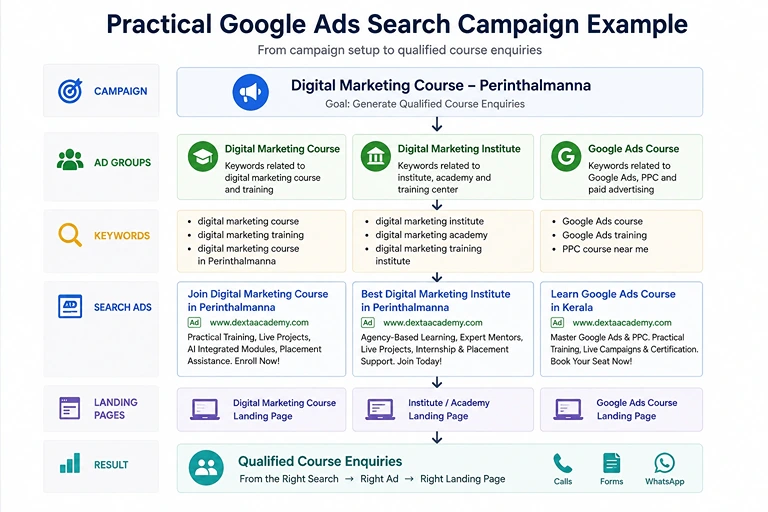
Practical Dexta Academy Campaign Example
Here is a simple campaign structure for generating local course enquiries.
Campaign
Search | Digital Marketing Course | Perinthalmanna | Leads
Campaign Settings
- Goal: Qualified course enquiries
- Location: Perinthalmanna and selected nearby areas
- Conversion actions: Forms, calls, and relevant WhatsApp enquiries
- Budget: Based on the expected cost per qualified enquiry
- Landing page: Relevant course page
Ad Group 1: Digital Marketing Course
Possible keywords:
- digital marketing course in Perinthalmanna
- digital marketing training near me
- practical digital marketing course
Ad Group 2: Digital Marketing Institute
Possible keywords:
- digital marketing institute in Perinthalmanna
- digital marketing academy in Perinthalmanna
- digital marketing training institute
Ad Group 3: Google Ads Course
Possible keywords:
- Google Ads course in Kerala
- Google Ads training
- PPC course near me
Each ad group should have relevant ads and a suitable landing page.
Location-based searches can lead to Dexta’s digital marketing course in Perinthalmanna page. Google Ads-specific searches can lead to the dedicated Google Ads course page.
The structure is only the starting point. It must be supported by keyword research, competitor analysis, conversion tracking, ad testing, landing-page review, and regular optimisation.
Common Campaign Structure Mistakes
Beginners should avoid these common mistakes:
- Placing all services inside one campaign
- Mixing unrelated keywords in one ad group
- Creating too many campaigns with a small budget
- Sending every user to the homepage
- Optimising for clicks instead of qualified leads
- Ignoring the search terms report
- Launching without conversion tracking
- Making several major changes at the same time
A low cost per click does not automatically indicate a successful campaign. The campaign must generate actions that have real value for the business.
Dexta’s approach connects advertising with sales because a cheap lead that never responds or does not meet the course requirements is not equal to a genuine admission opportunity.
Google Ads Campaign Launch Checklist
Before launching your campaign, confirm that:
- The primary business goal is clear
- Conversion tracking works correctly
- The right campaign type is selected
- Budget and bidding match the goal
- Location settings are accurate
- Every ad group has one clear theme
- Keywords reflect relevant search intent
- Initial negative keywords are included
- Ads match their keyword groups
- Claims in the ads are accurate
- Useful assets are added
- Final URLs work
- Landing pages load properly on mobile
- Forms, calls, and CTAs work
- Campaign names are easy to understand
Final Thoughts
The best Google Ads campaign structure is not the biggest one. It is the structure that helps the marketer answer practical questions:
- Where was the budget spent?
- What did the user search?
- Which ad generated the enquiry?
- Was the lead relevant?
- Which landing page performed better?
- What should be improved next?
Remember this basic rule:
Use campaigns for major strategic control, ad groups for closely related themes, and ads and landing pages for specific user intent.
At Dexta Academy, students learn Google Ads through three months of classroom training followed by a one-month agency internship at Addox Digital. Students work on business research, keyword planning, campaign structures, landing-page planning, performance reports, and mentor-reviewed assignments.
Explore Dexta’s digital marketing course in Perinthalmanna or contact Dexta Academy to book a free guidance session.
Frequently Asked Questions
❓ What are the main levels of Google Ads?
The main levels are the account, campaign, and ad group. Keywords, ads, assets, and targeting elements are managed within this structure.
❓ What is the difference between a campaign and an ad group?
A campaign controls broad settings such as budget, bidding, location, and campaign type. An ad group organises closely related keywords and ads around one theme.
❓ Should every keyword have a separate ad group?
No. Keywords with the same intent, ad message, and landing page can be grouped together.
❓ Is Performance Max structured like a Search campaign?
No. Search campaigns commonly use ad groups and keywords. Performance Max uses asset groups and more automation across Google inventory.
Ready to Learn Google Ads Practically?
Learn campaign setup, keywords, ads, tracking, and optimisation through practical Google Ads training.
Explore Google Ads Training →About The Author

Raees Addox
Raees Addox is a digital marketing leader with 7+ years of industry experience, working at the intersection of digital marketing, sales, and AI. He is the Co-Founder of Addox Digital and Co-Founder & CEO of Dexta Academy.
0 Comment