

Accurate information, genuine reviews, and strong local relevance give a business the best chance of ranking higher on Google Maps.
best chance of ranking higher on Google Maps.
Google Maps has become one of the most important discovery channels for local businesses. When people search for a nearby clinic, restaurant, repair service, salon, shop, or professional, the businesses shown at the top often receive the first calls, visits, and enquiries.
Ranking higher on Google Maps can help a business generate:
- more phone calls;
- more website visits;
- more direction requests;
- more bookings;
- more in-store visits;
- more qualified local leads.
However, there is no single shortcut that guarantees the first position.
Google Maps rankings are mainly influenced by three factors:
- relevance;
- distance;
- prominence.
Distance is difficult to control because it depends on where the customer is searching from. However, you can improve how clearly Google understands your business, how trustworthy your profile appears, and how strongly your business is connected to the local area.
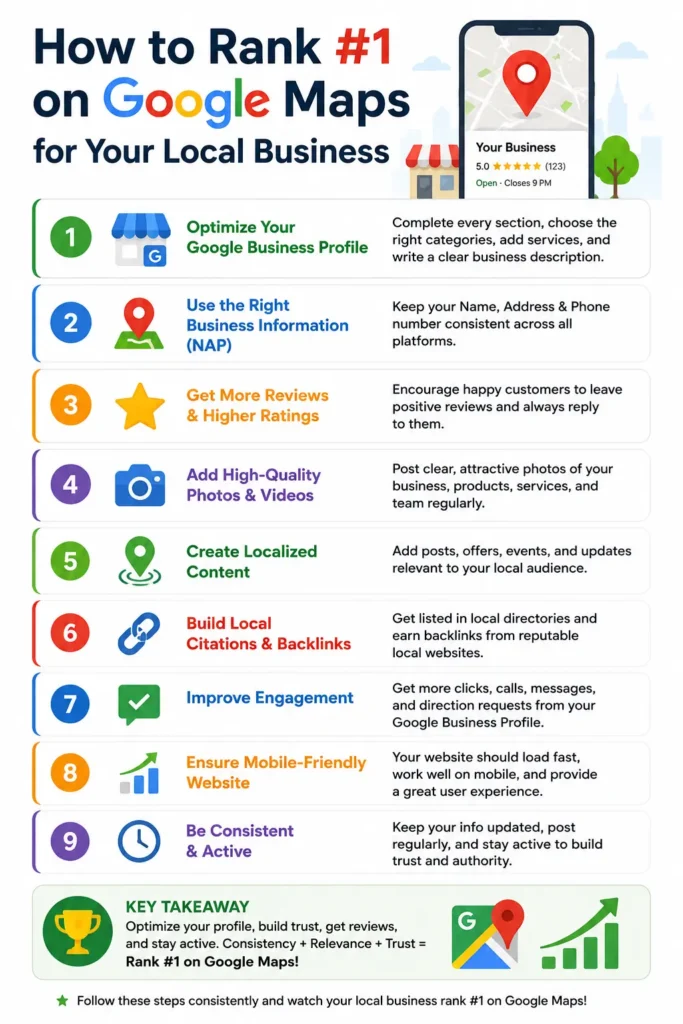
How Google Maps Rankings Work
Google Maps rankings depend on relevance, distance, and prominence rather than one isolated optimisation trick.
Before making changes to your profile, it is important to understand how local rankings work.
Relevance
Relevance means how closely your business matches what a customer is searching for.
For example, a customer searching for “AC repair in Kozhikode” is more likely to see businesses that clearly identify themselves as air-conditioning repair providers.
Google may understand your relevance through information such as:
- your primary category;
- secondary categories;
- products and services;
- business description;
- website content;
- customer reviews;
- location information.
The clearer your business information is, the easier it is for Google to match your profile with relevant local searches.
Distance
Distance refers to how close your business is to the customer or to the location mentioned in the search.
A nearby business may rank above a more established competitor simply because it is closer to the searcher.
This is why the same business may appear in different positions for customers searching from different neighbourhoods.
You cannot fully control distance, but you can make sure your location and service area information are accurate.
Prominence
Prominence reflects how trusted, established, and recognised your business appears.
Prominence may be influenced by:
- the number and quality of reviews;
- your overall online reputation;
- trusted directory listings;
- local news mentions;
- backlinks from relevant websites;
- your website’s search visibility;
- brand recognition.
A business with strong local trust signals is more likely to compete well in Google Maps.
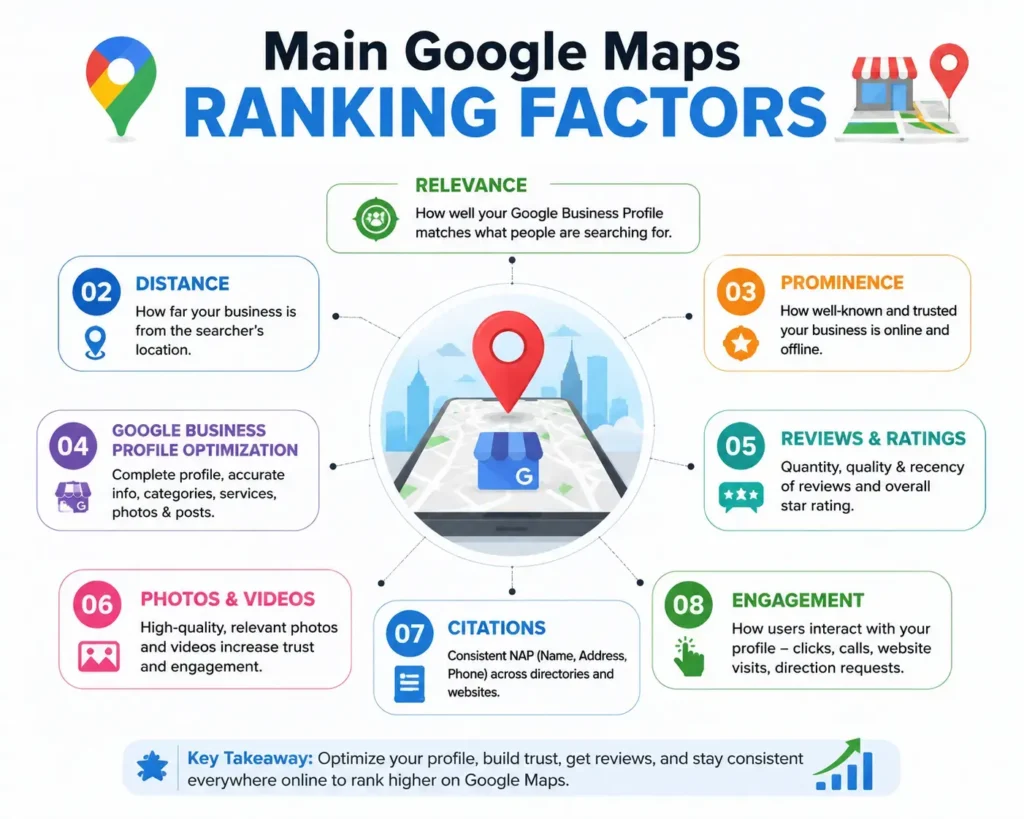
Main Google Maps Ranking Factors
| Ranking Factor | What It Means | Your Level of Control |
|---|---|---|
| Relevance | How closely the business matches the search | High |
| Distance | How close the business is to the customer | Low |
| Prominence | How trusted and established the business appears | Medium to high |
A well-optimised profile may still rank differently across locations because every customer searches from a different place.
Verify Your Google Business Profile
A verified Google Business Profile gives you control over the information customers see.
The first step is to claim and verify your Google Business Profile.
Before creating a new profile, search for your business name on Google and Google Maps. A profile may already exist.
When you find the correct listing, request ownership instead of creating another one.
Duplicate profiles can:
- confuse customers;
- divide reviews;
- display different contact details;
- weaken profile management;
- increase the risk of profile issues.
After claiming the profile:
- complete the available verification process;
- use a business-controlled email account;
- add only trusted owners or managers;
- remove former employees and old agencies;
- keep ownership records safely;
- review profile access regularly.
The business owner should always retain primary control, even when an agency manages the profile.
Use Your Real Business Name
Your Google Business Profile name should match the name customers see in the real world.
Use the genuine name of your business.
The profile name should match:
- your signboard;
- website;
- invoices;
- registration documents;
- social media pages;
- customer-facing materials.
For example:
Correct:
Bright Smile Dental Clinic
Avoid:
Bright Smile Best Dentist Root Canal Clinic Kochi
The second version adds keywords that may not be part of the real business name.
Avoid adding words such as:
- best;
- cheap;
- near me;
- top-rated;
- open 24 hours;
- city names;
- service lists;
unless they are genuinely part of the business name used in the real world.
Keyword stuffing may create a short-term ranking advantage, but it can also lead to profile edits, restrictions, or suspension.
Choose the Correct Primary Category
The primary category should describe the main nature of your business.
Your primary category is one of the strongest signals that helps Google understand what your business does.
Choose the category that most accurately represents your main activity.
Examples include:
- Bakery
- Dental Clinic
- Beauty Salon
- Restaurant
- Air Conditioning Repair Service
- Legal Services
Before choosing a category, ask:
- What is our main business activity?
- Which service generates most of our enquiries?
- What do customers know us for?
- Does this category match our website?
- Does it reflect our actual daily operations?
You can add secondary categories for genuine additional services.
However, adding too many unrelated categories can weaken your relevance and confuse customers.
Complete Every Important Profile Field
A complete profile helps Google understand the business and helps customers decide whether to contact it.
Fill in every profile field that applies to your business.
Important details include:
- business address or service area;
- phone number;
- website;
- opening hours;
- holiday hours;
- business description;
- products;
- services;
- appointment links;
- booking links;
- accessibility information.
Your business description should explain:
- what the business does;
- who it serves;
- where it operates;
- what its main services are;
- how customers can contact it.
Keep the description natural and useful.
For example:
“ABC Cooling Services provides AC repair, installation, cleaning, and maintenance for homes and small businesses in Kozhikode and nearby areas.”
This is clearer than repeating the same keyword several times.
Update the profile whenever your business hours, contact details, services, or location change.
Keep Your Business Information Consistent
Consistent business details reduce confusion for both Google and customers.
Your business name, address, and phone number should remain consistent across the web.
These details are often called NAP:
- Name
- Address
- Phone number
Review your information on:
- Google Business Profile;
- website;
- Facebook;
- Instagram;
- Justdial;
- IndiaMART;
- local directories;
- professional association websites;
- supplier listings.
Correct serious inconsistencies such as:
- old phone numbers;
- previous addresses;
- different business names;
- incorrect opening hours;
- broken website links;
- duplicate listings.
Small formatting differences are less important than major conflicts.
For example, “Main Road” and “Main Rd” are usually less serious than two completely different phone numbers.
Quick NAP Audit
- Search your business name on Google.
- Open the first 15 or 20 results.
- Compare the name, address, and phone number.
- Correct outdated information.
- Record the date of each update.
A smaller number of accurate listings is more valuable than hundreds of low-quality directory submissions.
Add Genuine Products and Services
Clear product and service information helps Google match your profile with relevant customer searches.
Add the products and services customers can actually purchase.
For each service, include:
- a clear service name;
- a short explanation;
- the main customer benefit;
- a price or starting price when practical;
- a booking or enquiry option.
An air-conditioning company may list:
- AC repair;
- AC installation;
- AC cleaning;
- annual maintenance;
- gas refilling;
- commercial AC service.
A dental clinic may list:
- dental consultation;
- tooth cleaning;
- root canal treatment;
- braces;
- dental implants.
Do not add fake services only to target popular search terms.
The services shown on your Business Profile should also appear clearly on your website.
This consistency helps both customers and search engines understand your business.
Upload Real Photos and Videos
Genuine photos help customers recognise the business and feel more confident before visiting or contacting it.
Upload clear and recent images that represent your real business.
Useful photo types include:
- storefront;
- entrance;
- reception area;
- shop or office interior;
- team members;
- products;
- equipment;
- services in progress;
- completed work;
- parking area;
- nearby landmarks.
Avoid:
- copied images;
- unrelated stock photos;
- heavily edited images;
- repeated uploads;
- blurred photographs;
- misleading AI-generated images.
For a local business in Kerala, exterior photos that show nearby roads, junctions, or landmarks can help customers locate the business more easily.
Photo quality and authenticity matter more than the total number of photos.
Update your photos when your team, premises, products, or services change.
Ask Customers for Genuine Reviews
A steady flow of genuine reviews is more valuable than sudden batches of artificial ratings.
Reviews influence customer trust and can strengthen your local reputation.
Ask for reviews after:
- a completed purchase;
- a successful appointment;
- a delivery;
- an installation;
- a completed service;
- a resolved customer issue.
You can share your review link through:
- WhatsApp;
- SMS;
- email;
- invoices;
- receipts;
- QR codes.
A simple review request can say:
“Thank you for choosing [Business Name]. Your honest feedback helps other local customers make an informed decision. You can leave a Google review here: [Review Link].”
Never:
- buy reviews;
- create fake accounts;
- ask employees to post customer reviews;
- join review-exchange groups;
- reward customers only for five-star ratings;
- force customers to mention keywords;
- discourage unhappy customers from reviewing.
Myth vs Fact
Myth: Every review must mention a service or location keyword.
Fact: Customers should describe their genuine experience naturally.
Myth: A perfect five-star rating always looks more trustworthy.
Fact: Detailed and natural reviews often appear more credible than an unrealistic rating pattern.
A healthy review profile should grow gradually and reflect real customer experiences.
Lorem ipsum dolor sit amet, consectetur adipiscing elit. Ut elit tellus, luctus nec ullamcorper mattis, pulvinar dapibus leo.
Respond to Reviews Professionally
Professional review responses show that the business values customer feedback.
Reply to both positive and negative reviews.
For positive reviews:
- thank the customer;
- mention a genuine detail;
- keep the reply short;
- avoid copying the same response every time.
Example:
“Thank you for your feedback. We are glad the installation was completed on time and that our team could assist you.”
For negative reviews:
- stay calm;
- acknowledge the concern;
- avoid arguments;
- do not publish private customer information;
- explain the next step;
- invite the customer to contact you privately;
- investigate the issue internally.
Example:
“Thank you for sharing your experience. We are sorry that your appointment started later than expected. Please contact our manager so we can review the booking and assist you.”
A rude or defensive response can damage trust more than the original complaint.
Report a review only when it appears to violate platform policies, not simply because it is negative.
Improve Your Website for Local Search
Your website should confirm what the business offers, where it operates, and why customers should trust it.
Your website should support the information shown on your Google Business Profile.
It should clearly display:
- business name;
- address;
- phone number;
- opening hours;
- service information;
- location details;
- contact forms;
- booking buttons;
- customer testimonials;
- genuine photographs;
- secure HTTPS.
Create Useful Service Pages
Instead of listing every service in one short paragraph, create a dedicated page for each important service.
A good service page should explain:
- what the service includes;
- who needs it;
- common problems;
- the process;
- pricing approach;
- service area;
- frequently asked questions;
- how to book.
Create Genuine Location Pages
Businesses with real branches can create a unique page for each location.
Each location page should include:
- branch address;
- local phone number;
- opening hours;
- nearby landmarks;
- parking information;
- local photographs;
- services available;
- directions.
Do not create dozens of nearly identical pages by changing only the city name.
Location pages should provide genuine local value.
Build Trusted Local Mentions
Relevant local mentions strengthen the connection between your business, industry, and community.
Look for genuine opportunities to earn mentions from:
- local newspapers;
- chambers of commerce;
- professional associations;
- supplier websites;
- community organisations;
- event pages;
- colleges;
- trusted local directories.
Examples include:
- a restaurant featured in a local food guide;
- a clinic listed by a professional association;
- a shop sponsoring a community event;
- a training institute partnering with a college;
- a service company listed by an authorised supplier.
Avoid buying large numbers of unrelated backlinks.
One trusted and relevant local mention can be more valuable than many low-quality links.
Publish Useful Business Updates
Business updates are valuable when they provide timely and useful information for customers.
Use your Business Profile to publish updates such as:
- holiday opening hours;
- new services;
- seasonal offers;
- business events;
- temporary closures;
- appointment changes;
- important customer notices.
A Kerala service business may publish updates about:
- monsoon service availability;
- festival opening hours;
- emergency response times;
- road-access changes;
- seasonal maintenance reminders.
Do not post the same promotional message repeatedly.
Each update should answer a customer question, explain a change, or provide useful current information.
Track Leads and Sales
Calls, bookings, and completed sales matter more than one manually checked ranking position.
Google Maps rankings can vary based on:
- the customer’s location;
- the search phrase;
- competition;
- device;
- time;
- category.
Checking one keyword from your office does not show what every customer sees.
Track real business outcomes such as:
- profile calls;
- website visits;
- direction requests;
- booking clicks;
- WhatsApp enquiries;
- qualified leads;
- completed sales;
- new reviews.
Ask new customers:
“How did you first find our business?”
Record the answer in your lead or sales system.
Ranking first for a search that produces no customers is less valuable than ranking lower for a search that generates genuine sales.
Common Google Maps SEO Mistakes
Risky shortcuts may produce temporary visibility but can damage the profile in the long term.
Avoid these common mistakes.
Keyword Stuffing
Do not add unnecessary keywords to the business name.
Fake Locations
Do not create profiles for virtual offices, mailboxes, or places where the business does not genuinely operate.
Duplicate Profiles
Avoid creating multiple profiles for the same eligible business location.
Fake Reviews
Purchased or artificial reviews can damage trust and create account problems.
Unrelated Categories
Use only categories connected to your real services.
Copied Content
Do not copy competitor descriptions, service pages, or location content.
Outdated Information
Correct old phone numbers, addresses, opening hours, and broken links.
Ignoring Customer Enquiries
A high ranking has little value when calls and messages are not answered.
Depending Only on Google Maps
Maintain your website, customer database, referrals, and other marketing channels.
A Practical Local Business Example
Better profile accuracy and faster enquiry handling can improve sales before the business reaches the first position.
Consider a fictional AC repair company in Kozhikode.
The business has a verified profile but receives only a few enquiries.
A review of the profile reveals several problems:
- the primary category is too broad;
- the phone number differs from the website;
- individual services are not listed;
- the photos are outdated;
- customer reviews have no replies;
- enquiries are answered slowly.
The business makes the following changes:
- selects a more accurate primary category;
- corrects the phone number everywhere;
- adds repair, installation, and maintenance services;
- uploads genuine photographs of recent work;
- responds to customer reviews;
- shares a review link with recent customers;
- creates a useful Kozhikode service page;
- assigns one person to answer calls and WhatsApp messages.
Over time, the business begins receiving more qualified enquiries.
This is an illustrative example, not a guaranteed result.
Field Note
Many local service businesses lose leads because calls and WhatsApp messages are not answered quickly.
A better Google Maps ranking cannot solve that operational problem by itself.
Before investing heavily in visibility, make sure the business has a reliable system for handling new enquiries.
Use the MAPS Framework
The MAPS framework keeps local SEO focused on accuracy, proof, local relevance, and measurable results.
M — Maintain Accuracy
Keep your business name, address, phone number, website, opening hours, and category correct.
A — Add Proof
Use real reviews, photographs, services, completed work, and customer stories to build trust.
P — Prove Local Relevance
Build local website pages, accurate directory listings, community mentions, and trusted local links.
S — Study Outcomes
Measure calls, enquiries, bookings, direction requests, and completed sales.
30-Day Google Maps Action Plan
| Week | Main Action | Expected Output |
|---|---|---|
| Week 1 | Correct profile details | Accurate name, phone, address, category, and hours |
| Week 2 | Improve profile content | Better services, description, photos, and website links |
| Week 3 | Strengthen customer trust | More genuine reviews and professional responses |
| Week 4 | Measure performance | Clear data on calls, leads, bookings, and sales |
The first 30 days should focus on fixing accuracy and customer experience.
Long-term growth requires ongoing maintenance, reputation building, and website improvement.
Monthly Google Maps Checklist
Regular maintenance prevents outdated information and missed customer opportunities.
Every month:
- check the business name, address, and phone number;
- update opening and holiday hours;
- reply to new reviews;
- upload recent photos;
- remove outdated services;
- test website and booking links;
- review owner and manager access;
- check directory listings;
- record calls and enquiries;
- compare sales with the previous month.
Keep screenshots and update dates as proof of your work.
A simple monthly review is usually more effective than making random profile changes every day.
Frequently Asked Questions
Google Maps rankings vary by location and search context, so no business can guarantee the same position everywhere.
Can anyone guarantee the first position on Google Maps?
No. Rankings depend on relevance, distance, prominence, competition, and customer location. A legitimate consultant cannot guarantee the same ranking for every user.
How long does it take to rank higher on Google Maps?
There is no fixed timeline. Basic profile corrections may help quickly, while reviews, website authority, and local reputation can take several months.
Do reviews help Google Maps visibility?
Genuine reviews can improve customer trust and strengthen local prominence. Review quality and consistency matter more than sudden artificial growth.
How many reviews does a business need?
There is no universal number. Compare your review volume, quality, and recency with genuine competitors in the same category and location.
Should keywords be added to the business name?
Only when those words are genuinely part of the real business name. Extra keywords can increase the risk of profile edits or restrictions.
Do photos improve rankings?
Photos do not guarantee a ranking increase. However, clear and genuine photos can improve profile quality and customer confidence.
Long-term Google Maps visibility comes from accurate information, genuine customer trust, and consistent local business activity.
Ranking higher on Google Maps does not come from one shortcut.
Start by claiming and verifying your Google Business Profile.
Use your real business name, choose the correct category, and complete every important field.
Keep your contact details consistent across your website and trusted directories.
Add genuine products, services, photos, and customer information.
Ask real customers for honest reviews and respond professionally to their feedback.
Support your profile with a useful website, strong service pages, real location information, and trusted local mentions.
Most importantly, track:
- calls;
- bookings;
- enquiries;
- website visits;
- direction requests;
- qualified leads;
- completed sales.
Google Maps rankings can change based on location, competition, and search context. For that reason, no business can guarantee the first position for every search.
The strongest long-term strategy is simple:
Keep your information accurate, provide excellent service, earn genuine trust, and make it easy for local customers to contact your business.
About The Author

Raees Addox
Raees Addox is a digital marketing leader with 7+ years of industry experience, working at the intersection of digital marketing, sales, and AI. He is the Co-Founder of Addox Digital and Co-Founder & CEO of Dexta Academy.
0 Comment